Photo And Text1.4
Publisher Description
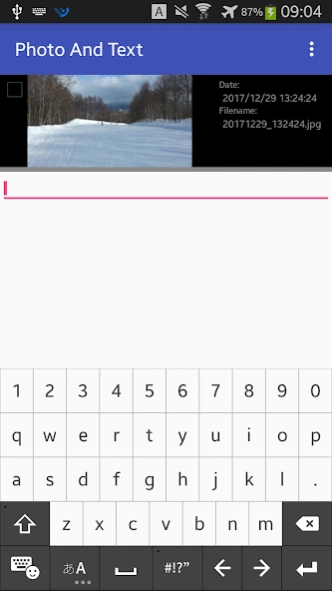
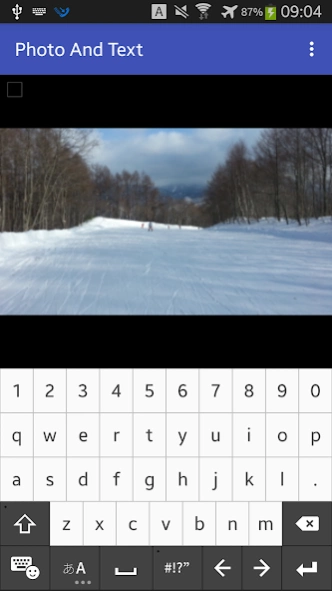
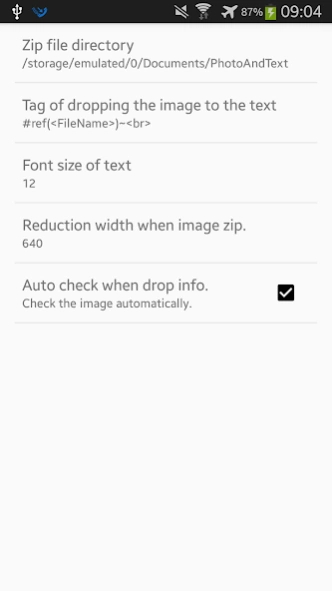
I tried making it like that, "Let's write a sentence while watching photos."
When I want to write a blog about many images taken at a trip, it is inconvenient if I can not write a sentence while watching a picture?
You can write sentences while swiping photos and insert photo informations into sentences as necessary.
Although it is designed on the premise that it operates with the keyboard, almost all functions can be used even without it.
When you launch the application, it automatically displays the pictures and images taken the most recently and the sentence input column.
When you leave the application, the sentences are automatically saved. No troublesome operation such as specifying the image folder and saving operation is necessary at all.
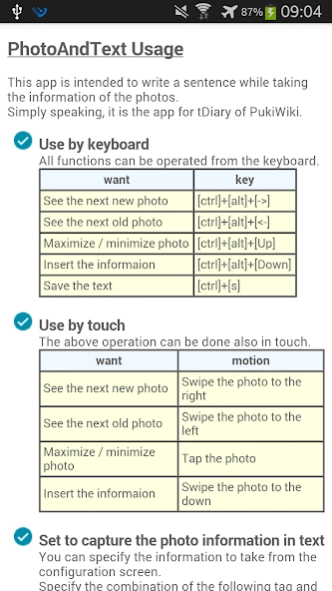
* Use by keyboard
[ctrl]+[alt]+[<-] : See the next new photo
[ctrl]+[alt]+[->] : See the next old photo
[ctrl]+[alt]+[Up] : Maximize / minimize photo
[ctrl]+[alt]+[Down] : Insert the informaion
[ctrl]+[s] : Save the text
* Use by touch
Swipe the photo to the right : See the next new photo
Swipe the photo to the left : See the next old photo
Tap the photo : Maximize / minimize photo
Swipe the photo to the down : Insert the informaion
After writing a sentence, please copy and upload it to your own blog page.
About Photo And Text
The company that develops Photo And Text is Akira Atsumi. The latest version released by its developer is 1.4.
To install Photo And Text on your Android device, just click the green Continue To App button above to start the installation process. The app is listed on our website since 2017-12-30 and was downloaded 2 times. We have already checked if the download link is safe, however for your own protection we recommend that you scan the downloaded app with your antivirus. Your antivirus may detect the Photo And Text as malware as malware if the download link to jp.co.webdb.photoandtext is broken.
How to install Photo And Text on your Android device:
- Click on the Continue To App button on our website. This will redirect you to Google Play.
- Once the Photo And Text is shown in the Google Play listing of your Android device, you can start its download and installation. Tap on the Install button located below the search bar and to the right of the app icon.
- A pop-up window with the permissions required by Photo And Text will be shown. Click on Accept to continue the process.
- Photo And Text will be downloaded onto your device, displaying a progress. Once the download completes, the installation will start and you'll get a notification after the installation is finished.
Program Details
System requirements
Download information
Pricing
Version History
version 1.4
posted on 2017-12-31
2017/12/31 ver.1.4 Image list function added.
Fixed a case that it might crash at the first startup.
A progress dialog is displayed when collecting image information at startup.
version 1.2
posted on 2016-12-04
ver.1.2 support Android6.0 and above.
